
A typical application of the Logarithm I/O is to create a vertical axis in dB in the oscilloscope or spectrum analyzer.
Properties
To control the behavior of the Logarithm I/O, several properties are available.
These can be accessed through a popup menu which is shown when the I/O is right clicked in the Object screen.
The properties can also be accessed through its settings window which is shown when the I/O is double clicked in the Object screen.
To open the Object screen, click the  Show object screen button.
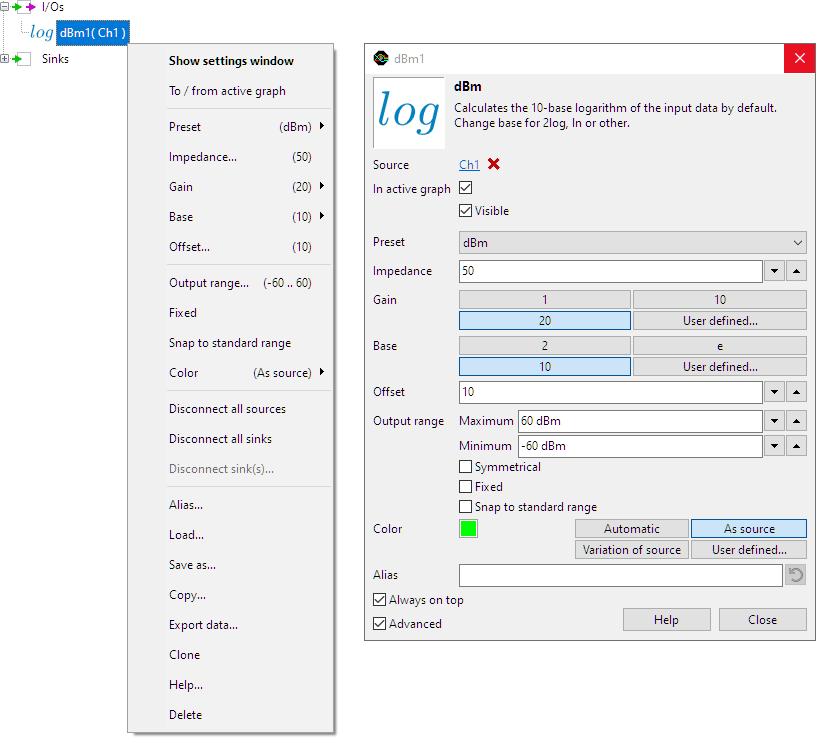
By default, the settings window only shows the most used settings. When Advanced is ticked, the extended window with all settings is shown. See also the program settings.
Preset
The Logarithm I/O has a number of Presets that will set the base value, the gain value, the offset value and the impedance value. The unit is set accordingly. The presets are:
- None No specific presetting is used.
- dB calculates 20 * 10log(input value).
- dBV is the voltage ratio, relative to 1 V.
- dBmV is the voltage ratio, relative to 1 mV.
- dBµV is the voltage ratio, relative to 1 µV.
- dBµV/m (at 10m) is the voltage level in decibels referenced to 1 microvolt per meter at 10 m distance. It is used for electric field intensity measurements.
- dBm is the power ratio relative to 1 mW. The dBm setting requires a virtual impedance in which the power would be dissipated.
The presets set the following values for the various properties:
| Preset | Base | Gain | Offset | Impedance | Unit |
|---|---|---|---|---|---|
| None | 10 | 20 | 0 | - | dB{source unit} |
| dB | 10 | 20 | 0 | - | dB |
| dBV | 10 | 20 | -3.01 | - | dBV |
| dBmV | 10 | 20 | 56.99 | - | dBmV |
| dBµV | 10 | 20 | 116.99 | - | dBµV |
| dBµV/m (at 10m) | 10 | 20 | 94.77 | - | dBµV/m (at 10m) |
| dBm | 10 | 20 | 10 | 50 | dBm |
Italic values indicate fixed values that cannot be changed. Changing any of the Gain, Base or Offset values will force the Preset to None.
Impedance
The preset dBm uses an adjustable virtual Impedance to convert the measured voltage to power. The default value for the impedance is 50 Ohm.
Gain
The Gain property sets the gain of the Logarithm I/O. Commonly used gain factors of 1, 10 and 20 are available, as well as a user defined setting. The default value for the gain is 20.
Base
The Base property sets the base number of the logarithm calculation. Commonly used base numbers of 2, e and 10 are available, as well as a user defined setting. The default value for the base number is 10.
Offset
Some presets use an Offset, which is applied to the output of the logarithm calculation. The default value for the offset depends on the selected preset.
Common properties and actions
Related information

Gain / Offset
The Gain / Offset I/O multiplies a signal with a constant gain factor and adds a constant offset.
Add / Subtract
The Add / Subtract I/O adds or subtracts data of two or more sources.
Multiply / Divide
The Multiply / Divide I/O multiplies or divides data of two ore more sources.
Sqrt
The SQRT I/O calculates the square root of each sample of the source's data.
ABS
The ABS I/O takes the absolute value of each sample of the source's data.
Differentiate
The Differentiate I/O differentiates the source's data.
