Contents
Introduction
By default, most TiePie engineering measuring instruments work in scope or block mode. In this mode, the complete measurement is recorded in the instrument's memory. After the full record has been measured, the data is transferred to the computer. The next measurement is started after the data has been processed, therefore there are gaps between the measurements.
Besides working in block mode, all TiePie engineering instruments support streaming mode. In this mode the measured data is transferred directly to the computer, without using the internal memory of the instrument. This makes it possible to perform continuous measurements without gaps.
Streaming versus block measurements
Both block and streaming measurements have their advantages and disadvantages. The key features of both modes are listed below.

Block mode (or scope mode):
- Fast measurements are possible
- Triggering of measurements is available
- Record length is limited by the instrument's memory size
- Consecutive measurements will have time gaps between them

Streaming mode:
- Sample speed is limited by the data transfer rate to computer and the computer speed
- A measurement is started and stopped manually, triggering of measurements is not available.
- Unlimited long measurements are possible
- Measurements contain no time gaps
In block mode, the next measurement is started after the previous data has been transferred to the computer. This means that there will always be a (small) gap in between the measurements. In streaming mode, no data is missed. All successive data chunks can be connected to form one big measurement.
A disadvantage of the streaming mode, is that the maximum measurement speed depends on the data transfer rate from the instrument to the computer, and on the overall system performance. Also, in streaming mode, triggering is not available. Measurements are started and stopped manually.
Selecting streaming mode
By default, most TiePie engineering measuring instruments work in scope or block mode. There are several ways to set an instrument's mode to stream.
The easiest way to use the streaming mode is to use one of the Signal logging Quick
Setups.
These are selected by clicking the  Quick Setup button, selecting the Load Quick Setup option in
the File menu or by pressing hotkey Shift + Ctrl + O.
In the selection dialog, select Signal logging and then select the required number of input channels,
the required signal frequency range and the required input range.
When the Quick Setup is loaded, your instrument is ready to measure.
Quick Setup button, selecting the Load Quick Setup option in
the File menu or by pressing hotkey Shift + Ctrl + O.
In the selection dialog, select Signal logging and then select the required number of input channels,
the required signal frequency range and the required input range.
When the Quick Setup is loaded, your instrument is ready to measure.
Streaming mode can also be selected using one of the quick functions: "Signal logging".
This function can be selected by clicking the
 Signal logging button on the quick function toolbar or by selecting it from the quick functions menu.
This function will set the selected instrument's mode to "stream".
Besides this, for each channel of the instrument a data collector I/O object is created
with a data size of 100000 samples and each data collector is put into a graph.
Signal logging button on the quick function toolbar or by selecting it from the quick functions menu.
This function will set the selected instrument's mode to "stream".
Besides this, for each channel of the instrument a data collector I/O object is created
with a data size of 100000 samples and each data collector is put into a graph.
To manually change the mode of an instrument, click the Measure mode button on the
instrument toolbar to toggle between
 block mode and
 streaming mode.
The measure mode of an instrument can also be changed by using the popup menu of the instrument in the object screen.
In the menu, select or .
streaming mode.
The measure mode of an instrument can also be changed by using the popup menu of the instrument in the object screen.
In the menu, select or .
Using streaming mode
In streaming mode, the measured data will arrive in chunks. Each of those chunks contains record length samples which are sampled at sample speed. These two settings determine the time it takes for a chunk of data to be measured, which is also the time between the arrival of two consecutive chunks.
Each time when a chunk arrives, the computer will process it and, depending on what is connected to the channel(s) in the software, perform mathematical operations with it, show it in a graph and/or store it to disk.
When the time between two consecutive chunks is short (the update is rate high), there is a risk that the computer is not able to process all data before the new chunk arrives. This may result in the streaming measurement being aborted.
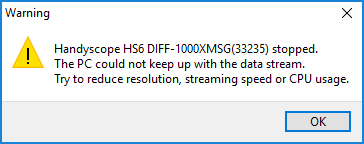
It is recommended to keep the update rate lower than approximately 10 updates per second (a chunk measuring time larger than 0.1 second). Additionally it may help to reduce the post processing load by reducing the graph size by resizing the graphs and temporarily hiding lines in the graph(s) until the measurement is ready.
Collecting streaming data
In streaming mode, successive measurements will arrive in chunks. Each of those chunks contains "record length" samples and can be connected seamlessly with previous and next data chunks.
The Data collector I/O object can be used to collect the successive measurements and combine them into one big chunk of data of up to 50 million samples.
All I/Os and sinks in the Multi Channel oscilloscope software support both block mode data and streaming data and can therefore be used in all situations.
Storing streaming data to disk can be done with the Disk writer sink. It can handle multiple streams directly, without the requirement of a Data collector in between.
Streaming measurements can be performed with all TiePie engineering WiFiScopes and USB oscilloscopes.
