May 26, 2026
Version 1.49 of the Multi Channel oscilloscope software is now available for download.
A lot of changes have been made to add new functionality and to improve basic operations in the software. This is a categorized overview of some of the changes.
Contents
New serial communication protocol decoder I/Os
A number of new serial communication protocol decoder I/Os are added to the Multi Channel oscilloscope software.
With the scope the relevant analog signal(s) of the communication bus are measured. The measured signals are then connected to the protocol decoder I/O, which decodes the signals into decoded messages. The messages can be shown in a Table sink.
New LIN decoder I/O

An LIN decoder I/O is added, to decode analog data on a Local Interconnect Network bus to LIN message data. Just measure the signal line of the LIN bus with a scope and connect the measuring channel to the LIN decoder I/O.
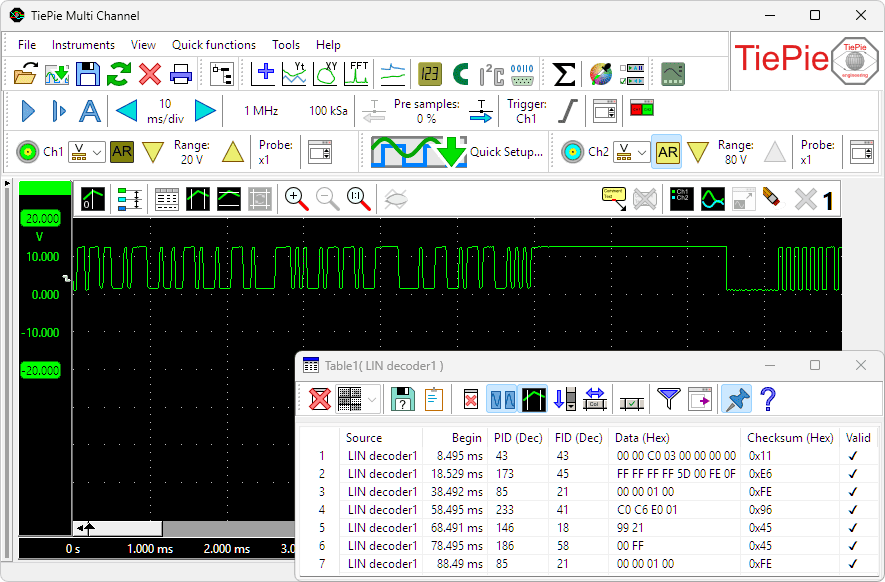
The LIN decoder has the following features:
- Automatic baudrate detection and user defined baudrate setting
- PID decoding
- FID decoding
- Checksum verification
- Parity verification
New SENT decoder I/O

A new SENT decoder I/O is added to the Multi Channel oscilloscope software, decoding analog data on a SENT bus to SAE J2716 SENT message data and displaying the transferred messages.
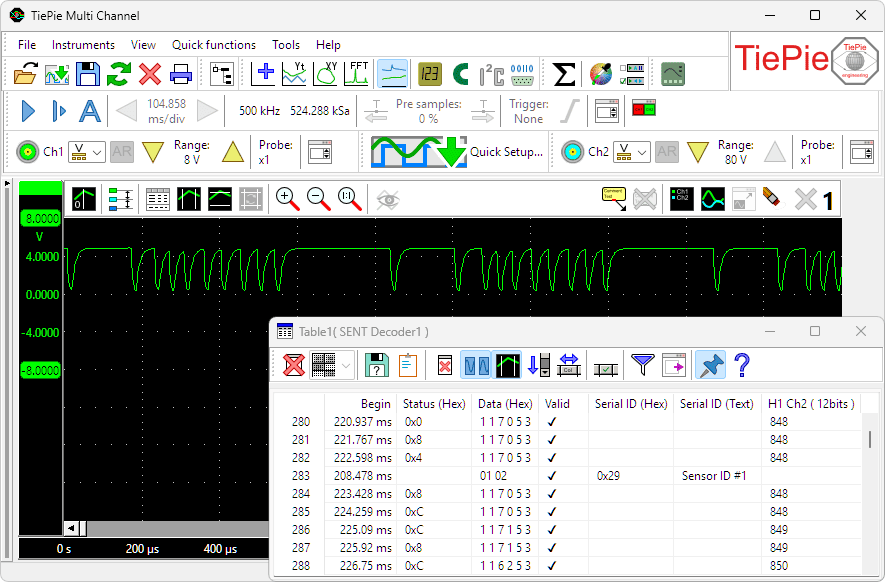
The SENT decoder has the following features:
- Automatic clock tick detection and user defined clock tick setting
- Automatic pause pulse detection and user defined pause pulse setting
- Data decoding
- Value decoding
- Checksum verification
New DMX512 decoder I/O

A new DMX512 decoder I/O is added to the Multi Channel oscilloscope software. It decodes analog data on a DMX512 bus to DMX512 message data and displays the transferred messages.
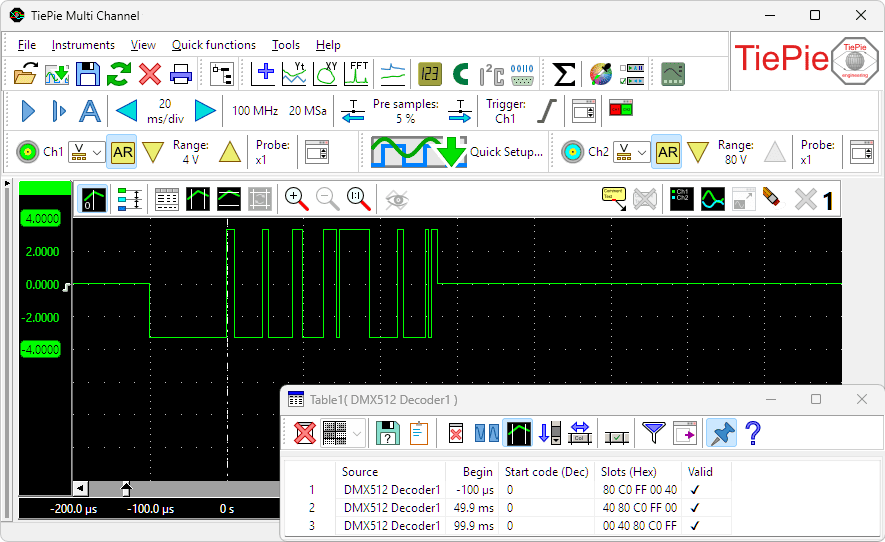
The DMX512 decoder has the following features:
- Automatic level and hysteresis settings
- Start code decoding
- Slots decoding
- Validity verification
New FlexRay decoder I/O

A new FlexRay decoder I/O is added to the Multi Channel oscilloscope software. It decodes analog data on a bus to FlexRay message data and displays the transferred messages.
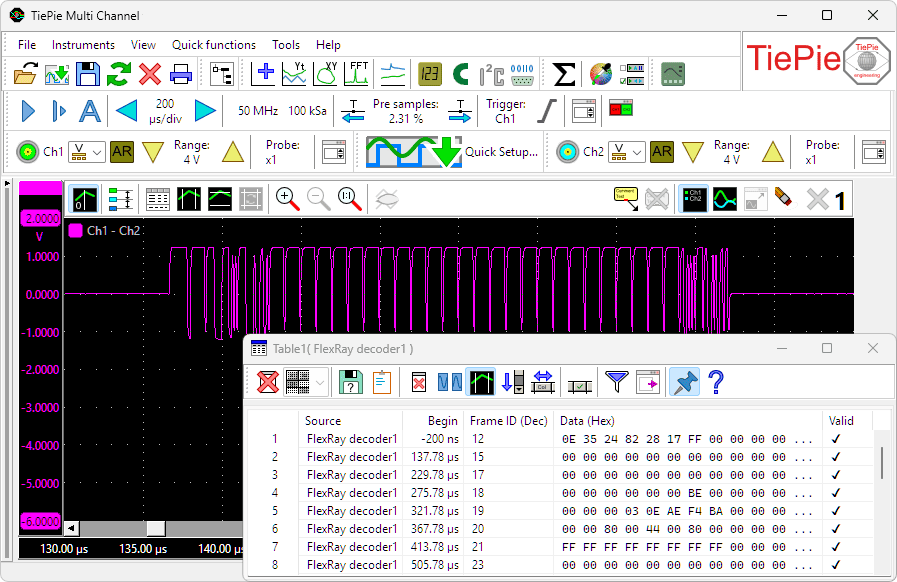
The FlexRay decoder has the following features:
- Automatic baud rate detection
- Supports channel A and channel B
- Automatic channel detection
- Validity verification
New Value extractor I/O added

When a serial communication, like e.g. CAN, LIN or SENT is decoded, a stream of data is obtained. This data can be shown in a table, but it is much more useful if a specific value in that data stream can be isolated and monitored, either in a graph, in a meter or in a table. The Value Extractor I/O can be used to extract such values from the data stream and present them in a graph, meter and/or table sink.
The measurement below is performed in a car, on the SAE J2716 SENT bus, which connects sensors to the motor management system. In this measurement the communication from a pressure sensor is monitored and decoded by a SENT decoder I/O. The engine is running and the throttle pedal is pressed twice. Placing the extracted data in a table would generate a lot of numbers, making it difficult to see what actually happens. By using a Value extractor I/O and selecting the proper value from the data stream and showing its values in a graph makes perfectly visible what the pressure does when the throttle pedal is pressed.
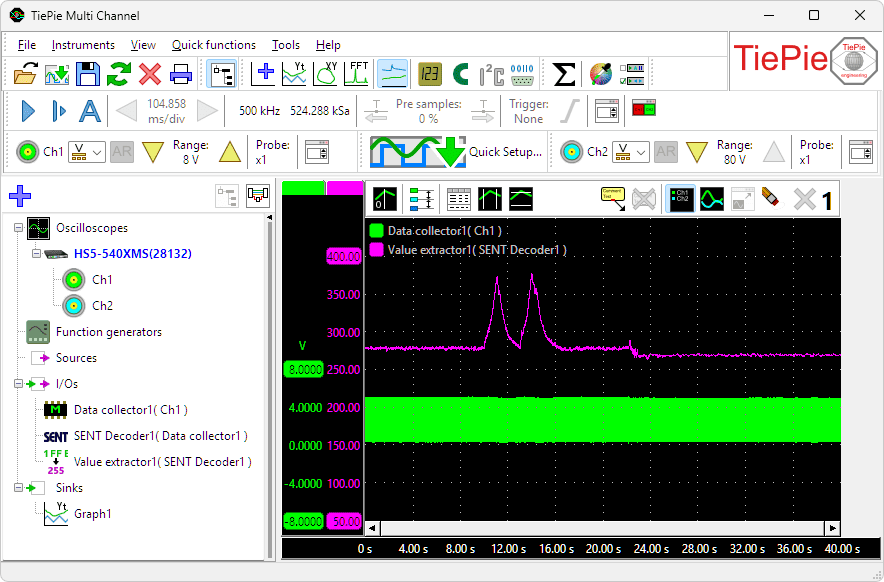
The Value extractor has the following features:
- Filter specific messages from the stream, based on read or write, address, ID, etc.
- Extract protocol specific values or generic values
- Convert extracted values to show them in a specific unit
The Value extractor I/O can be used with all protocol decoders.


When connected to a CAN decoder, it can extract plain CAN values, but also J1939 values and CANopen values.
Filtering table contents
New filtering functionality  is added to the Table sink.
When a serial communication, like e.g. I2C, LIN or SENT is decoded, a stream of data is obtained. This data can be shown in a table, but that can give an overwhelmingly full table. Using the new versatile filtering option, it is possible to show just the exact data you need to.
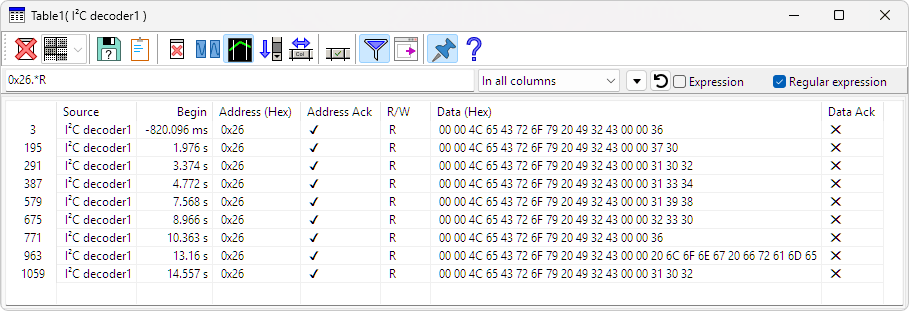
Table filtering can use:
- plain text filtering
- regular expressions
- Lua expressions and scripting
New functionality for Disk writer sink
New functionality is added to the Disk writer sink. The settings window of the Disk writer can now be kept open, once a file name is set. This allows to change settings of the Disk writer while measuring. Additionally, several new settings are added:
- An option is added to use a temporary file name while measuring. When the is measurement is ready, the file is renamed to the intended name.
- A File count limit is added to the disk writer, with the option to stop storing files or to delete oldest files.
-
For easy access of the stored files, a
 Show destination folder button is added.
Fixed the file options drop down boxes, they were not showing the current value.
Other changes
Several other improvements and additions are made to the software. The most important are:
- A Gaussian window is added to the FFT I/O, the PSD I/O and the Window I/O.
- The battery status for combined WiFiScopes is now shown on the instrument taskbar, as well as in the Instrument information dialog.
- The Multi Channel oscilloscope software is now DPI aware and supports high DPI displays.
- Changes made to the Table column visibility settings are now saved in the application ini file.
- Improved the error messages that are shown when making a syntax error in input edit boxes.
- The presets dBu from Vpeak, dBmV from Vpeak and dBuV from Vpeak for the Logarithm I/O and logarithmic vertical axes were wrong, which is now fixed.
- Fixed a missing part of at the beginning of a graph when printing.
- Added a message dialog to the Manage instruments dialog when Windows denies access to WiFi when scanning for instruments. As of Windows 11 version 24H2 location access is required to access WiFi information.
-
Arbitrary Waveform Generator:
- Fixed loading arbitrary waveform data from specific DAT files into the generator.
- Fixed function keys not working in the generator screen.
-
Fixed enabling the
 Combine button when trying to combine one or more Automotive Test Scope ATS5004Ds.
- Updated the driver installer to version 10.0.3.
- Updated libtiepie-hw to version 1.5.6.