
The LIN decoder I/O decodes analog data on a Local Interconnect Network bus to LIN message data. The LIN decoder has auto level detection and auto baud rate detection. The output of the LIN decoder I/O can be shown in a Table sink or passed on a to a Value extractor I/O.
The following fields are extracted from the LIN communication and shown as a column in the table:
| Field name | Purpose | Default shown |
|---|---|---|
| PID (Hex) | Protected IDentifier in hexadecimal notation | |
| PID (Dec) | Protected IDentifier in decimal notation | |
| FID (Hex) | Frame IDentifier in hexadecimal notation | |
| FID (Dec) | Frame IDentifier in decimal notation | |
| Data (Hex) | The data in hexadecimal notation | |
| Data (Dec) | The data in decimal notation | |
| Data (ASCII) | The data in ASCII notation | |
| Checksum (Hex) | The checksum in hexadecimal notation | |
| Checksum (Dec) | The checksum in decimal notation | |
| PID parity valid | Indicating the PID parity is valid | |
| Checksum valid V1 | Indicating the checksum is valid according version 1 determination | |
| Checksum valid V2 | Indicating the checksum is valid according version 2 determination | |
| Valid | Indicating the LIN message is valid | |
| Flags | Flags regarding the LIN message |
To show or hide specific columns from the table, use the Select columns
( ) button
in the Table sink.
) button
in the Table sink.
Double clicking a row in the table will zoom the active graph in to the time frame corresponding to the table row.
The Value extractor I/O can be used to extract a specific value from the decoded data and present that in a graph, a meter or a table.
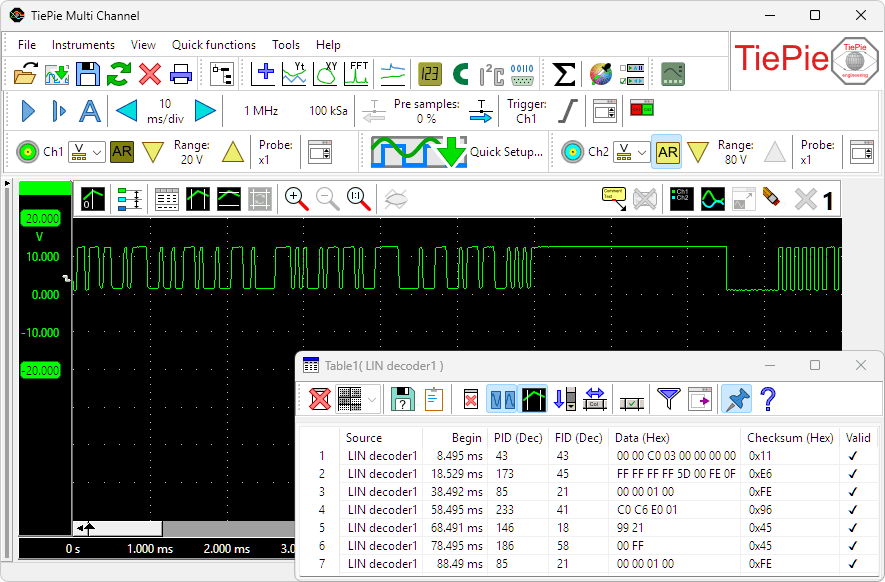
Measurement on a LIN bus, with data decoded by a LIN decoder.
LIN decoder properties
To control the behavior of the LIN decoder I/O, several properties and actions are available.
These can be accessed through a popup menu which is shown when the I/O is right clicked in the Object screen.
The properties can also be accessed through its settings window which is shown when the I/O is double clicked in the Object screen.
To open the Object screen, click the  Show object screen button.
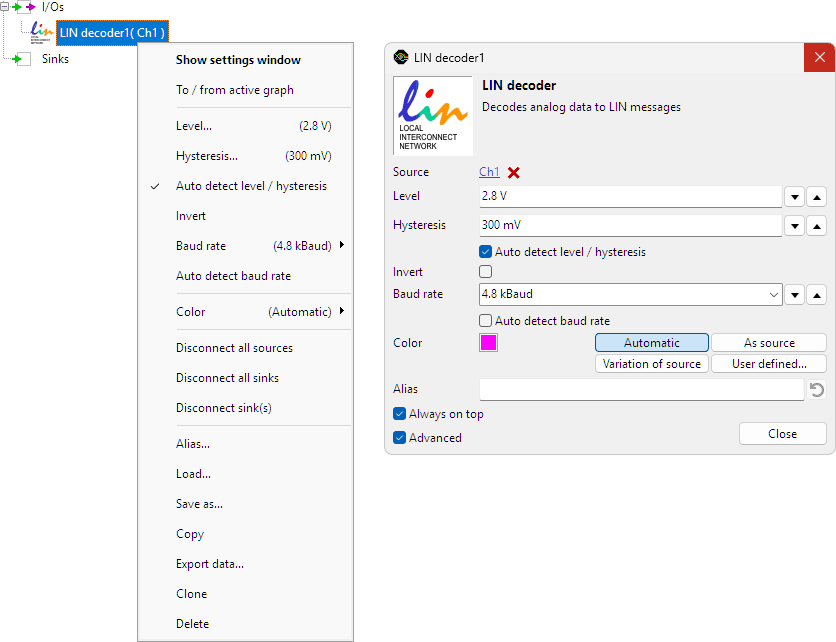
By default, the settings window only shows the most used settings. When Advanced is ticked, the extended window with all settings is shown. See also the program settings.
Level
In order to decode the analog signal into a digital signal, the LIN decoder I/O compares the analog input signal with a mid level: anything above that level is considered "high" and anything below that level is considered "low".
Hysteresis
To minimize the effect of noise on the signal when comparing the signal to the level, a Hysteresis can be used around that level. Anything above "level + hysteresis/2" is considered "high" and anything below "level - hysteresis/2" is considered "low".
Auto detect level and hysteresis
Enabling Auto detect level and hysteresis will let the software determine a suitable mid level and hysteresis, based on the measured signal. Each time new data is available, the suitable level and hysteresis will be determined again. In streaming mode, level and hysteresis are determined once based on the first chunk of data and remain at these values though out the whole measurement.
Auto detect level and hysteresis is default enabled.
Invert
For correct detection, the Invert property must be set to the correct value, corresponding to the bus that is under measurement.
- When Invert is disabled levels above signal mid level are logic 0, levels below signal mid level are logic 1
- When Invert is enabled levels above signal mid level are logic 1, levels below signal mid level are logic 0
Invert is default off.
Baud rate
For correct detection, the Baud rate property must be set to the correct value corresponding to the bus that is under measurement. It can be set to several common standard values, but it is also possible to enter an arbitrary value in the Baud rate edit field.
Auto detect baud rate
Enabling Auto detect baud rate will let the software determine the correct baud rate, based on the measured signal. Each time new data is available, the baud rate will be determined again. Auto detect baud rate is default enabled.
Common properties and actions
Related information

I2C decoder
The I2C decoder I/O decodes analog data on the SDA and SCL lines of an I2C bus to I2C data.
UART / Serial decoder
The UART / Serial decoder I/O decodes analog data on a UART, RS232, RS485, MIDI, DMX, LIN or other compatible serial bus to serial data.
CAN decoder
The CAN decoder I/O decodes analog data to CAN data.
J1939 decoder
The J1939 decoder I/O extracts SAE J1939 SPN values from CAN messages.
SPI decoder
The SPI decoder I/O decodes analog data on an SPI bus to SPI data.
SENT decoder
The SENT decoder I/O decodes analog signals on a SENT bus to SAE J2716 SENT messages.
DMX512 decoder
The DMX512 decoder I/O decodes analog signals on a DMX512 bus to DMX512 messages.
FlexRay decoder
The FlexRay decoder I/O decodes analog data on a bus to FlexRay message data.
Value extractor
The Value extractor I/O extracts a specific value from a decoded serial communication and makes it available for graphs, meters and tables.
